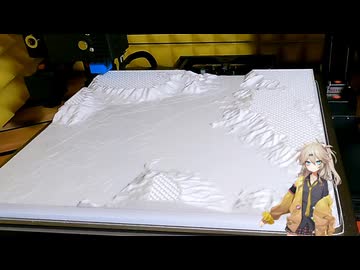
地理院地図から3D地図をダウンロードして3Dプリントします。<br>平面の地図でもプロジェクションすると、立体感きます。<br><br>3Dプリンター: JGMaker<br>フィラメント: PLA 白<br><br>カメラ:GoPro Hero 9, iPhone SE<br>地図:国土地理院「地理院地図」 <a href="https://maps.gsi.go.jp/" target="_blank" rel="noopener nofollow">https://maps.gsi.go.jp/</a><br>Google Map <a href="https://www.google.com/maps/" target="_blank" rel="noopener nofollow">https://www.google.com/maps/</a><br>フィラメント写真:Amazon <a href="https://www.amazon.co.jp/" target="_blank" rel="noopener nofollow">https://www.amazon.co.jp/</a><br>立ち絵素材: 春日部つむぎ公式立ち絵素材<br> <a href="https://booth.pm/ja/items/3474402" target="_blank" rel="noopener nofollow">https://booth.pm/ja/items/3474402</a><br>立ち絵編集: PSDTool<br><a href="https://oov.github.io/psdtool/" target="_blank" rel="noopener nofollow">https://oov.github.io/psdtool/</a><br>音声: VOICEVOX 春日部つむぎ<br><a href="https://voicevox.hiroshiba.jp/" target="_blank" rel="noopener nofollow">https://voicevox.hiroshiba.jp/</a><br>BGM: 騒音のない世界 きらめくウィークエンド<br><a href="https://soundcloud.com/" target="_blank" rel="noopener nofollow">https://soundcloud.com/</a>